
Reviewed by the Foxmole editorial team · 2026-07-29
- Key takeaways
- 1. Read the domain name carefully, left of the first slash
- 2. Check for HTTPS, but know its limit
- 3. Look for a real way to contact a real company
- 4. Be suspicious of urgency and too-good pricing
- 5. Search the site name plus “scam” or “review”
- 6. Don’t trust links in emails or texts, navigate yourself
- 7. Add a reputation check that works before you click
Key takeaways
- Check the real domain, the part just before the first single slash.
- A padlock means encrypted, not honest, use it with the other checks.
- Search “[site name] scam” before you trust a new site.
You’re about to log in, buy something, or download a file, and a small voice asks: is this site legit? Here’s how to answer that in under a minute, using checks you can do yourself.
1. Read the domain name carefully, left of the first slash
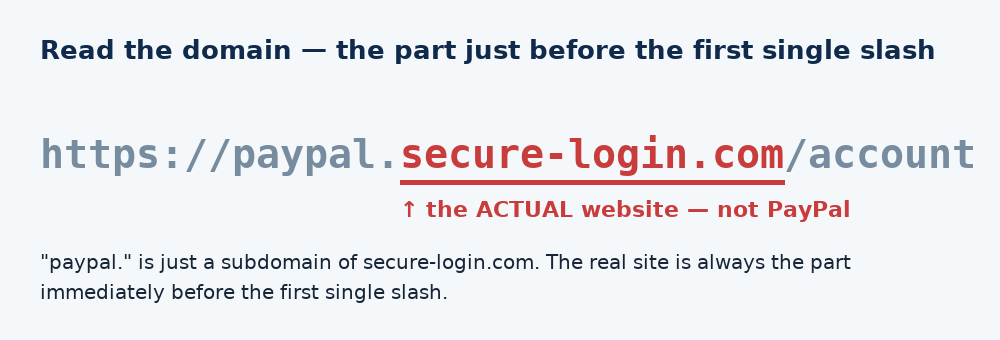
Scammers rely on lookalikes. The real domain is the part immediately before the first single slash. In paypal.secure-login.com/account, the actual site is secure-login.com, not PayPal. Watch for swapped letters (paypa1.com), extra words (apple-support.co), and unusual endings.
2. Check for HTTPS, but know its limit
A padlock and https:// mean traffic is encrypted, so nobody can snoop it in transit. It does not mean the site is honest, scam sites use HTTPS too. Treat “no padlock” as a hard stop, but “has padlock” as necessary, not sufficient.
3. Look for a real way to contact a real company
Legitimate businesses have a physical address, a support channel, and legal pages (privacy policy, terms). A shopping site with no contact info and no company details is a red flag.
4. Be suspicious of urgency and too-good pricing
“Only 2 left!”, “Your account will be closed in 24 hours”, 90%-off luxury goods, pressure and implausible deals are the two most common levers in online scams.
5. Search the site name plus “scam” or “review”
Thirty seconds in a search engine surfaces other people’s experiences. No footprint at all for a supposedly established store is itself a warning.
6. Don’t trust links in emails or texts, navigate yourself
If “your bank” emails you, don’t click the link. Type the bank’s address yourself or use your saved bookmark. This defeats the majority of phishing attempts outright.
7. Add a reputation check that works before you click
Your browser catches some known-bad sites, but a dedicated safety extension checks links against a broader, faster-updated database and warns you on phishing and lookalike domains before the page loads. It’s a low-effort extra layer, see our guide on browser security extensions.
Quick FAQ
Is a padlock enough to trust a site? No, it means encrypted, not honest. Use it with the other checks above.
What if I already entered my password on a fake site? Change that password immediately, enable two-factor authentication, and change it anywhere you reused it.
Are website “trust seal” badges reliable? Only if they’re clickable and lead to a real verification page. Anyone can paste a static badge image.